Ben Nichols Game/Level Designer
Sanctuary
Sanctuary is a first person multiplayer game that uses social manipulation as its core component. The aim of the game is to be the last one surviving.


Sanctuary
Game Summary:
Genre: 1st Person, online, social deduction game.
2021
Group Project
Type:
Prototype
Development time:
4 months
Role(s):
Lead Level Designer
Engine:
Unity
Target Market: Fans of Among Us and Paranoia, fans of social deduction games
Synopsis:
In this game your aim will be the last one to stay alive. There will be a minimum of 4 players in the game, one of which will be the killer and another player have the computer role. Everyone must find out who the killer is and everyone will strive to be the computer. The computer will be a set of cameras that the player can switch between and have the ability to activate traps and lock doors but more importantly can see everything. At the end of each round the players can vote who will play the computer next and vote on who the killer is. Players will use whatever strategy they want in order to stay alive the longest.
Pros:
Fun to play, level fits the games theme.
Improvements:
Map is too large, causing some issues if there aren't many players.
Design pillars:
Fun: Aim was to create a fun and socially driven game. Achieved via: The games mechanics and pacing.
Level pillars:
Atmosphere: The game should feel tense and give the feeling that death could be behind every corner. Achieved via: Multiple access points, limited field of vision, lots of hidey holes and many places to get killed.
Game Development
Sanctuary is a social deduction game where players must find out who the killer is and to be the last one alive. Players will vote after each round and game will stop when either the killer is found or everyone is dead.

Mechanics:
Boxes:
- Boxes act as a currency in the game.
- Boxes will be dotted around the map
for players to pick up.

Traps:
- Various traps are placed around the
map
- Players can use their currency to activate these traps

Cameras:
- One player will have control other all the cameras in the level.
- Cameras are placed all over the level and the player is allowed to call out all actions seen.

(Camera POV)

Timer:
- Players will be given a set time in each round and they must make it back to the start area before the game/timer ends or they'll die.
Killer:
-Each game will have a designated killer who's job it'll be to make sure no one is able to make it back to the start area a the end of a round.


How does level help enhance these mechanics
Room layouts:
- Each room will typically have 2-3 points of access. This allows for greater mobility for the players.
- Automatically closing doors creates multiple blind spots adding to the social deduction element of the as the killer can stay more concealed.

Zone:
- Each zone is colour coded which helps if players are doing any call outs in game. Although zones are big enough to make these call outs quite vague giving the killer time to hide away.

Teleporters:
- Teleporters are a great strategical tool for the killer and a great escape mechanic for the players.
- Teleporters allow players to shoot around the level and are coloured coded to tell players which zone they'll end up in.


World Building
The level was design as a space-station with each zone having a unique function on this space-station. This makes the world more believable and gives each zone more character.
Red zone = Living quatres

Green zone = Herbology

Orange zone = Storage
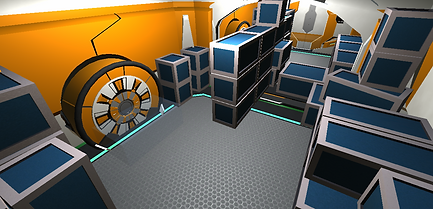
Yellow Zone = Armory

Blue Zones = Engine rooms

Level Development
Concept Designs & Blockouts: We first created concept pieces and blockouts to get an idea of scale and how the zones would work and interconnect with each other.


Art style: As we only had one artist on our team we knew we would need asset packs to help us create our environment. Ones we acquired the right asset pack we started on converting our blockouts.

Creating zones: We knew we wanted the zones to be a specific size, not too big so players wouldn't find each other and not too small so that they would constantly bump into each other.

Light pass, Gameplay Elements & Props: The final stage of development was getting the interior lights sorted, adding in all the traps and teleporters and doing a final prop pass.
Light Pass


Prop Pass
Final Pass


Issues faced & creative solutions
Symmetry:
The building blocks of our level was made up of rooms and corridors. There two elements needed to be connected at exactly the right place for the the two elements to look properly connected.
Issue:
As the corridor asset is slightly longer then the room asset this coursed us frequently to misalign the two assets. Making it very frustrating to create event a small section of connected rooms and impossible to connect up two zones together.

Rooms
Corridors
Solution:
Firstly I shorted the corridors so they matched the size of the rooms. I then created a large 15x15 array of room assets to map out each zone, then connected all these zones together. By doing this I knew that if a room correctly connected to the outline then it would align with adjacent zones.


Size:
During the course of developing & testing the level, size become more of a notice able issue the level was becoming far too big and was making it far to hard to find other players when doing playtests.
Solution 1 :
I reduced the size of the section and completely restructured the corner zones turning them into half-sized zones.


- Replaced purple zones with blue zones
- Halved size of blue zones


Solution 2 :
Second solution was to increase the number of teleporters we had in each zone (each zone now had 2-3 teleporters), this allowed players to easily traverse the environment and increased player encounters.
Lighting:
There is a total of 700 lights in this level, so no surprise Unity crashed when baking the lighting. Lighting was also having an increasing effect on game performance so became crucial that this was fixed.

Solution 2 :
We created a custom light occlusion culling script which made lights outside of the a set radius to the player turn off. This allowed us to back the lighting and significantly improved performance.


Importance of lighting


