Props and Lighting
- Ben Nichols

- May 2, 2021
- 4 min read
Since my last blog post I have been doing a lot of work getting the level finished my main aim over the last two sprints has been to start adding in lighting and doing prop dressings for all of the zones. Though before I get to that bigger news in that I have re-scaled the size of the map.

Original Map

New Map Layout
As shown be the images above the main difference, is that two zones are completely gone now (Violet and Indigo) along with significant cuts being made to the Blue zones. The main reason this came about was because I couldn’t see us getting a quality map in with the time remaining (3 Weeks till deadline) so being the lead level designer at the start of our last sprint (19th April) I stated my thoughts to the group and we voted to cut the map. I am very happy with this change as it means that instead of 7 different zones having to be light fitted and prop dressed I only had to do 5 and as the blue zones were significantly smaller and the same structure wise, meant I didn’t need to spend as much time on them. The main reason I am happy with this change though is because it now gives me time to do a quality pass at the level meaning that I will be testing to see how easy it is to navigate around the map and make sure that the player can’t escape the map/ fall out the level by accident.
Prop Dressing:
As each zone has a different use to it I have had to find appropriate asset packs to match the purpose. For example in the image above Orange zone can be seen which has the purpose of Food and storage, so I had to find appropriate assets to use for this zone.
Issues:
Though it has been great being able to cut the map I am still running into issues, with the main one (in terms of props ) being assets missing there textures and materials. As we are using URP (Universal Rendering Pipeline) and a lot of the asset packs that I have installed for the purpose of props don’t, this has meant that a lot of the materials can’t be found. So in order to fix this issue I have had to manually change a lot of the material shaders for the game.

What it should look like [1]

What it looks like in game
To counter this I have mostly been changing shader values to URP> Lit, this sometimes fixes the issues but most of the time I have had to just make my own materials and apply these.

Re-Textured Props
In the image above it shows that I have just been using basic colours, though I still think this works and is the most time efficient solution to the problem. After speaking to the techs as well they said the only other option would have been to switch pipeline which could result in loads of other texture going missing and they advised against it. Apart from this issue I have had no major issues with props apart from the fact that I have had to add convex mesh colliders to the props.
Lighting:
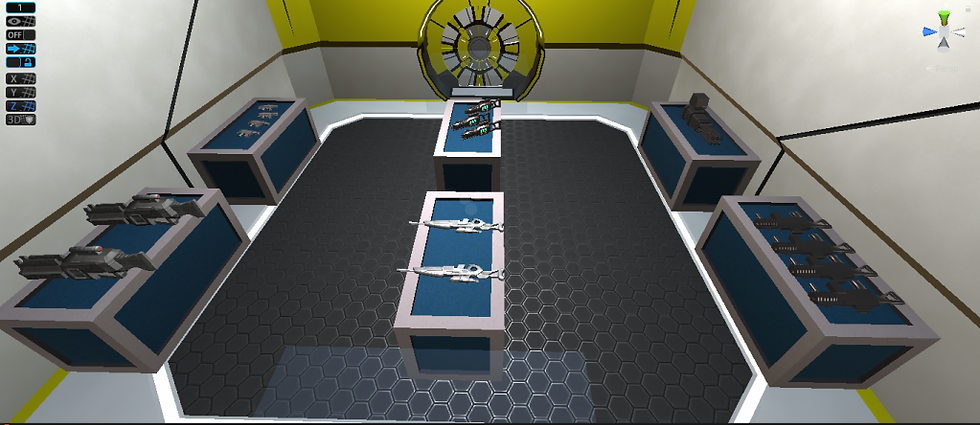
Yellow Zone Armory [2]
For the lighting I have had to make many changes, after speaking to a tech they have stated that due to the amount of lights that we will be using in scene it would be best to go with Dynamic and real time lighting as these are better for performance and will take less time to generate. They also stated that for an interior piece that spot lights would be the best lights to use as they don’t need to be baked. So with this in mind I went about adding in spot lights which roughly comes to about 700 lights in scene.
Issues:
Due to the vast amounts of lights in scene Unity is struggling to handle generating this number, so when I press generate lighting it inevitably crashes Unity, I know this isn’t an issue with my computer as it is very new. I have turned down the resolution along with making sure there are only one bounce on the lights and that reflection probes have all been removed. The issue is still happening and I found out yesterday when making the new map prefab that Unity must have a light limit in our scene as when I enable all the zones , some of the lights will start turning off, clearly showing to me that there is a limit. I will be contacting the techs this week, though the only solution that I am aware of will be to either start cutting the lights down e.g. no lights in corridors only rooms. Worst case scenario we will have to start using the light source colour, which uses colour to light a scene, this doesn’t look nearly as good but will if necessary light the scene.
[1] VDGames, WarZone Sci-Fi Turret pack, Dec 17, 2018, Access at: https://assetstore.unity.com/packages/3d/environments/warzone-sci-fi-turret-pack-57540, [Downloaded on: 30/04/2021]
[2] Black Curtain Studio, Scifi Gun Collection, Feb 25 2016, Access at: https://assetstore.unity.com/packages/3d/props/guns/scifi-gun-collection-56350,%5BDownloaded on: 30/04/2021]


Comments